

If you’ve used the original Osmosis Study Schedule, you already know how helpful it is for staying organized and on top of your coursework and exam prep. We’ve taken everything you liked about the old version and rebuilt it from the ground up to make it even better.
Study Smarter, Not Harder with a Schedule That Works For You
Whether you’re preparing for a big exam like USMLE® Step 1 or 2, COMLEX®, NCLEX®, or PANCE®, or just want help staying on top of your coursework, the new Osmosis Study Schedule gives you the tools to take control of your time and make progress every day.
And the great news is it’s for all Osmosis learners! Nursing, PA, Dental, and Pharmacy learners will also have access and benefit from the new, more flexible design.
What’s New?
We’ve talked to a lot of Osmosis learners. We’ve reviewed your feedback. And we’ve reimagined the Study Schedule tool based on what features and functionalities you told us were most important to you.
Flexible Scheduling
Pick your study days, set your hours, and choose the pace that works best for you. Add rest days, adjust your schedule, and update your calendar using drag-and-drop to move tasks to other days, as needed. And, if you fall behind, the schedule rebalances itself!
“It does the hard work for me [by] building the schedule.” – Osmosis Learner & Beta Tester

Pro Tip: Taking a weekend off for a quick vacation or starting a new clinical program schedule? Just drag-and-drop your study tasks to the next available day, and the schedule updates automatically. No guilt or spreadsheet math required!
Choose How You Want to Study
Prefer taking quizzes over watching videos? Want to mix in flashcards, readings, or Complete Anatomy models? You decide. You can change your study mode at any time.
“I like seeing progression and organizing my study resources.” – Osmosis Learner & Beta Tester

Pro Tip: Start your day with Osmosis videos to build a strong foundation. Then switch to flashcards and quizzes to reinforce and test your knowledge.
Curious about the effectiveness of various study techniques? Check out our Ultimate List of Osmosis Study Tips.
Pre-study Checklist
Get focused before you get started! You can add a quick checklist to remind you to grab the supplies you need (e.g., a pencil, tablet, etc.), create a prompt to help you limit distractions, and get suggestions for how to get in the right mindset to study.
Checklist Options:
- Grab water/snack
- Close extra browser tabs
- Set a 25-minute timer (Pomodoro-style)
- Put your phone on Do Not Disturb
“The pre-study checklist [and] the monthly and weekly spread is cool. It takes into account the number of hours to study each day and tailors the resources accordingly. Overall, very good.” – Osmosis Learner & Beta Tester
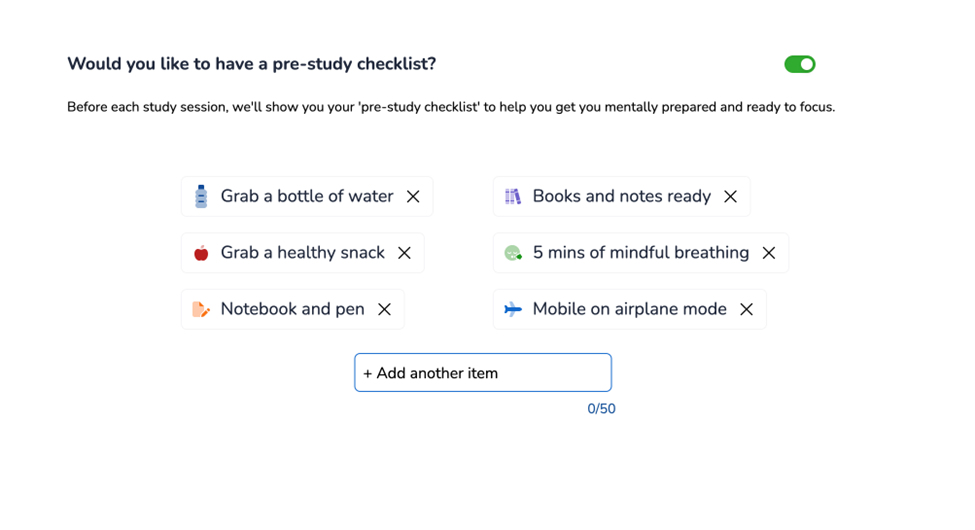
Pro Tip: Use this checklist every time you start a study block. It boosts focus and helps create a pre-study routine that keeps you on track.
Automatic and Manual Tracking
Videos are marked as done when you’ve watched 80% of the content. Flashcards, notes, and quizzes are manually marked complete, so you’re always in control.
“I like seeing progression and organizing my study load. [It] makes me feel accomplished.” – Osmosis Learner & Beta Tester
Pro Tip: After finishing a quiz or flashcard deck, make sure to mark how confident you felt about your answers. It’s an extra step, but it helps you prioritize what to revisit before your next test.

Monitor Your Real-time Progress
Watching your progress as you make your way through your study schedule encourages you to stay on track! See how far you’ve come, how much time you’ve spent, and what’s left to do at a glance.
“The progress bar is really motivational (10/10). Overall amazing UI (9.5/10)” – Osmosis Learner & Beta Tester
Pro Tip: Set a daily or weekly goal—not just for hours studied, but for maintaining momentum (like “four study days in a row” or “complete all tasks by Friday”).
Set Your Finish Line
Choose your end date! Whether your goal is getting an A+ on a final exam, prepping for boards, or just staying on top of your coursework. And if your plans change, you can adjust your deadline.
“I love the formatting and timeline for the schedule. It organized content from intro to advanced.” – Osmosis Learner & Beta Tester
Pro Tip: Use the “reverse planning” approach. Enter your test date first, and let the tool break down what to do each day to hit your goal.
Create Customized Tasks
In addition to adding Osmosis-generated content, you can now include custom tasks within a study schedule. This new feature gives you the flexibility to add your homework assignments, add reminders about upcoming practice exams, group reviews, or wellness activities.
Here are a few examples of customized tasks:
- Review class notes from Dr. Smith’s lecture
- Do 20 UWorld questions on cardiology
- Go for a 30-minute walk
- Meditation + journal reflection
“I appreciate the pre-study checklist and the layout of the study schedule.” – Osmosis Learner & Beta Tester
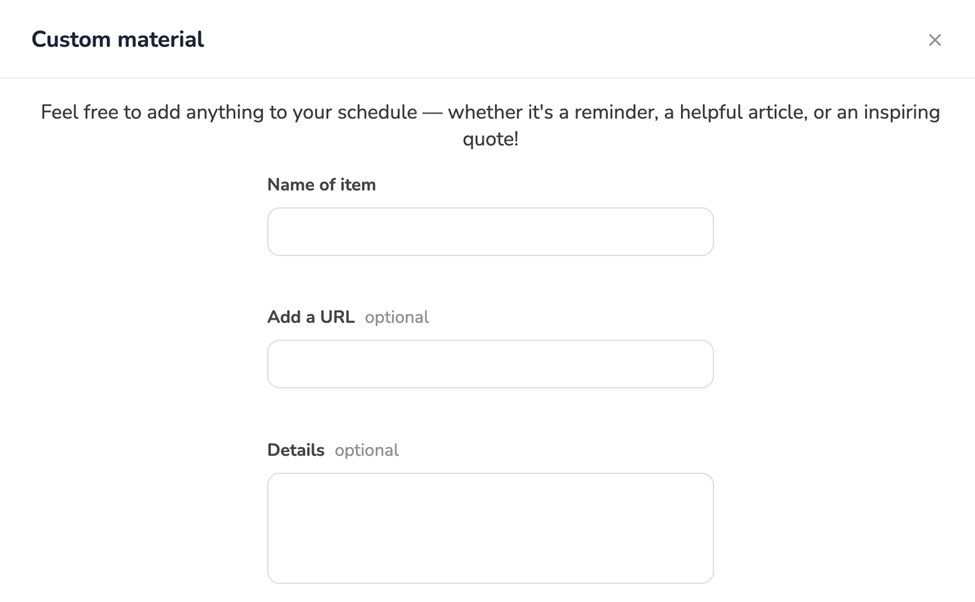
Pro Tip: Use Custom Tasks to blend academic goals with well-being. Try blocking one morning a week as “light study + self-care” with both learning and wellness activities on your task list.
Includes Cross-platform Integration
If you’re using Complete Anatomy, you can add it into your Osmosis Study Schedule. If you don’t see that feature yet, note that we’re starting with limited access, with full access coming once Complete Anatomy’s web version launches for individual learners.
Built to Support Your Mental Health and Well-being
Maintaining a healthy school-life balance is key to staying focused and on track. So, while studying is important, we also want to prioritize your health. That’s why we’ve included features to help you manage stress, avoid burnout, and feel good about your progress.
Pro Tip: Use the “Rest Day” feature at least once a week (we recommend at least two rest days) to reset and recharge. You can even add reminders, such as:
- “Go for a walk.”
- “Call a friend.”
- “Do a 10-minute meditation.”
Pre-study checklists, rest days, and flexible pacing all help you stay motivated and supported.
What Makes This Study Scheduling Tool Different?
Unlike other study schedule tools that focus mainly on questions and articles, the new Osmosis Study Schedule tool supports a variety of learning modes, whether you’re interested in watching illustrated videos, taking quizzes, using flashcards, exploring Complete Anatomy models, or using high-yield notes. The new tool helps you learn from every angle, so you can study the way that works best for you.
And the great news is that it’s not just a planner; it’s truly a study companion. We know that your time is precious, and content overload is real. That’s why we’ve reimagined the Osmosis scheduling tool to feel modern, manageable, and easy to use. Your time matters, and we understand that how your day is structured can make all the difference.
You now have the option to:
- Start with a custom or Pre-Built Schedule with topics preselected for board exams like the USMLE Step 1 & 2, COMLEX, NCLEX, or PANCE.
- Choose your topics and subtopics
- Decide how many hours a week you want to study
- Pick the format you learn best from
- Track your progress in real time
- Add your own custom tasks and schedule wellness breaks
In short, it works like a study coach and a planner in one!
How to Get Started with the New Study Scheduling Tool
The new Study Schedule is live! Have you used it yet?
If you’re already an Osmosis learner, then you’ll see the Study Schedule tool in the main left navigation.
If you’re new to Osmosis, register now to start building your personalized study schedule! Whether you’re a first-year medical or dental student, an aspiring PA or NP, or prepping for finals in nursing school, we’re here to help you succeed. Just look for “Study Schedule” in the (left) main menu. We encourage you to give it a try and start building your personalized study schedule today.
Pro Tip: Try the “Template” feature to explore pre-set schedules for USMLE® Step 1 & 2, COMLEX®, NCLEX®, PANCE®, or a mid-term review.
Final Thoughts: Take Control of Your Study Sessions
Keep in mind, this isn’t just an update of the old tool. It’s a complete rebuild designed to give you more control, more structure, and genuine support as you study. This tool is for every learner who wants to feel more confident going into boards or stay on track during the school year.
Key Takeaways
- Customize your study days, hours, and pace for a personalized learning experience.
- Drag and drop tasks to easily adjust your schedule without stress.
- Choose study modes like videos, quizzes, flashcards, and anatomy models.
- Use pre-study checklists and rest days to boost focus and prevent burnout.
- Track progress in real time to stay motivated and meet your goals.
We can’t wait for you to give the Osmosis Study Schedule tool a try. Tell us what you think in the comments below!

Leave a Reply